Ad Blocker Detected
Our website is made possible by displaying online advertisements to our visitors. Please consider supporting us by disabling your ad blocker.
Did you know that up to 30% of portable power is wasted with poor load management? We equip you to pair devices, verify secure connections, and enable essential permissions so our monitoring starts correctly. We’ll outline real‑time outlet dashboards, automatic thresholds, and alerting, then cover safe charging and battery care. Stay with us as we compare models and practical deployments for camping, travel, or emergencies, and tighten your setup before you head out.
Key Takeaways
- Set up and pair the device with the app, ensure power/LEDs show pairing readiness, and establish a secure Bluetooth or Wi‑Fi connection.
- Enable required app permissions (location, notifications) and run initial diagnostics to verify device name and time synchronization.
- Use the real-time dashboard to monitor per-outlet power, voltage, and energy, labeling outlets and configuring thresholds for alerts or shutoffs.
- Practice safe charging and battery care, inspect cables, follow recommended charging rates, and store units at proper temperatures.
- Compare options by battery capacity, usable energy, port variety, and app compatibility to choose the best app-controlled power station.
Set up Your Device and Pair With the App
To begin, we’ll power on the device and enable pairing mode, ensuring the battery is charged and within range of your mobile device. We follow a structured sequence: verify device LEDs indicate pairing readiness, open the companion app, and select Add New Device. The process requires confirming the exact model and firmware version, then establishing a secure connection via Bluetooth or Wi-Fi, depending on the unit. Document the successful link in the app’s device list and enable essential app permissions, including location and notifications, to support precise status reporting. Perform a quick diagnostic: test basic controls, confirm device name, and synchronize time stamps. Finally, complete the setup pairing by enabling auto-restore settings and saving user preferences to ensure consistent operation.
Monitor Power Use in Real Time and Manage Outlets
We’ll start by enabling real-time power monitoring and outlet management once the device is paired and connected. We describe a precise workflow: access the dashboard, view live consumption per outlet, and identify spikes. Real-time monitoring updates every few seconds, showing watts, voltage, and cumulative energy. We can label outlets, group devices, and set thresholds to trigger alerts or automatic shutoffs. Smart outlet control allows pausing or enabling ports without disrupting others, preserving essential loads. We recommend configuring a baseline rule set: monitor typical loads, disable idle outlets, and enable critical circuits during peak demand. Use charts and logs to compare usage over time, then adjust profiles to optimize efficiency. Confirm changes are saved, test by rechecking live readouts after each adjustment.
Safety, Charging Strategies, and Battery Care
Despite the need for rapid access to power, safety and battery care must guide every charging decision. We outline concrete practices that minimize risk while preserving device longevity, focusing on safety considerations and battery maintenance.
- Inspect plugs, cords, and adapters for damage before use, and replace compromised components immediately.
- Use manufacturer-recommended charging rates, avoid daisy-chaining multiple units, and monitor temperature during high-load sessions.
- Store stations between 20–25°C with partial charge, maintaining clean terminals and periodic calibration checks.
Applied approach: verify ventilation, keep away from liquids, and prefer official app guidance for firmware updates. By adhering to these steps, we enhance safety, extend battery life, and ensure predictable performance across scenarios.
Choose the Right App-Controlled Power Station for Your Needs
We start by evaluating your battery capacity needs through simple math to match runtime with tasks. Next, we verify app compatibility across your devices and ecosystems to ensure seamless control. Finally, we compare output ports and power options to cover your essential devices and future flexibility.
Battery Capacity Math
Choosing the right app-controlled power station hinges on understanding battery capacity and how it translates to usable energy. We quantify capacity in watt-hours (Wh) and relate it to runtime under typical loads, not raw cell mass. We also account for efficiency losses, temperature, and aging to estimate real-world performance. Battery capacity degrades with charging cycles, so current specs may drift over time. Our approach combines nominal capacity with expected depth of discharge and efficiency to forecast usable energy. This ensures informed comparisons across models and guarantees practical meetups for anticipated workloads.
- Understand Wh, runtime, and load relationship
- Consider aging via charging cycles and degradation
- Compare usable energy after efficiency and discharge limits
App Compatibility Check
Which app ecosystem best fits your workflow and device lineup? We begin with a precise compatibility assessment, focusing on app compatibility, OS support, and platform parity across devices. We verify whether the power station’s companion app is available on iOS, Android, or desktop environments, and confirm ongoing maintenance commitments, such as updates and bug fixes. Next, we evaluate pairing workflow: initial setup flow, device discovery, authentication, and secure pairing methods (BLE, QR codes, or account-based linking). We assess firmware upgrade paths and whether the app supports multiple devices under a single account. We also check accessibility of key features (remote control, scheduling, and status dashboards) across environments. Finally, we document any known limitations and recommended test procedures before purchase.
Output Ports Variety
What output ports does the power station offer, and how do they align with your device mix and charging needs? We assess port variety and port flexibility to map compatibility with common devices, from laptops to cameras. Our approach emphasizes clear specs, not guesswork, so you can forecast charging performance under load.
- Includes USB-C PD for fast laptop and phone charging
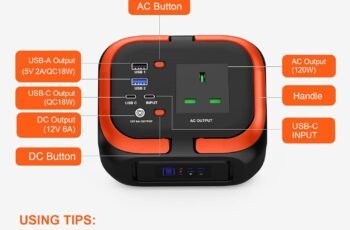
- Combines DC/AC outlets with dedicated USB-A/USB-C ports
- Maintains clear wattage ratings per port for safe distribution
We prioritize consistent operation, minimizing adapter clutter and ensuring simultaneous charging without dips. By evaluating port variety and total power budget, we select stations that support your multi-device workflow, reduce wait times, and sustain critical devices during outages.
Practical Use Cases: Camping, Travel, and Emergencies
We’ll examine how Camping Power Essentials, Travel Charging Scenarios, and Emergency Readiness Tips shape practical use of app-controlled power stations. We’ll outline essential devices, charging workflows, and quick-deploy safety checks to keep power available in outdoor, on-the-road, and crisis situations. This framework guides clear decision-making for real-world scenarios and immediate performance.
Camping Power Essentials
Outdoor power needs for camping span essentials like charging devices, running compact appliances, and ensuring safety-critical gear stays ready; the goal is to stay powered with lightweight, reliable energy, regardless of location. We present a practical approach to camping power, emphasizing efficient battery management and clear load prioritization. Our system design targets predictable runtimes, safe charging cycles, and minimal weight without sacrificing performance.
- Prioritized charging: phones, GPS, lighting, and radios first
- Battery management: state-of-charge awareness, temperature monitoring, and safe shutdowns
- System planning: runtime estimates, tool-less connections, and modular expansion
This method keeps camping power predictable while maintaining compact form factors, enabling reliable operation in remote sites. By focusing on battery management and disciplined load control, we sustain essential functionality during unexpected delays or weather changes.
Travel Charging Scenarios
Travel charging scenarios span camping, travel, and emergencies, applying the same disciplined power practices from camping power essentials to real-world, on-the-go use. We optimize load prioritization, battery health, and charger efficiency, ensuring dependable operation across settings. In transit, we rely on portable, high-efficiency outputs and fast-responding monitoring—keeping critical devices powered without overtaxing capacity. For travel, we map device profiles, charge cycles, and energy budgeting to predictable runtimes, preserving adventure reliability and avoiding outages. Our approach emphasizes portability efficiency and scalable power for varying devices, from phones to GPS units. The table below summarizes role-specific capabilities, enabling quick decisions while maintaining safety and performance.
| Scenario | Priority Devices | Power Strategy |
|---|---|---|
| Camping | Lights, router | Manage cycles |
| Travel | Phone, tablet | Optimize surfaces |
| Emergency | Heart monitor | Reserve capacity |
| Work | Laptop | Scheduling and load balance |
Emergency Readiness Tips
Ever wondered how to stay powered when emergencies strike, camping trips run long, or travel plans go awry? We outline practical readiness steps that leverage app-controlled power stations for reliable performance. Our approach emphasizes rapid deployment, high-efficiency use, and clear status feedback to maintain emergency redundancy and grid independence.
- Establish a prioritized load plan: essential devices first, then discretionary items, minimizing runoff and maximizing uptime.
- Verify charging and isolation procedures: pre-check outlets, safety switches, and device quarantines to prevent cross-contamination of power paths.
- Maintain portability and recharging cadence: keep compact cables, spare batteries, and solar input ready to sustain operations during outages or remote scenarios.
Quick-Start Tips and Troubleshooting on the Go
Wondering how to get up and running quickly? We’ll cover practical, on-the-go steps to minimize downtime. Begin with remote pairing: ensure the power station is reachable over your device’s network, then confirm the device shows a stable connection status. If pairing fails, retry within 60 seconds, verify Bluetooth or Wi‑Fi permissions, and consult the app’s diagnostic panel for error codes. Next, validate battery calibration: confirm the unit reports accurate voltage and capacity readings by running a shallow discharge and recharge cycle per the app prompts. If readings drift, perform a full calibration sequence, repeating until values stabilize within tolerance. For on-the-go troubleshooting, rely on built‑in logs, firmware check, and a quick reboot if issues persist. Maintain clear indicators and documented steps for repeatable results.
Frequently Asked Questions
How Secure Is My Data When Using the App?
We assess security risks: our app uses end-to-end data encryption, minimizes data exposure, and enforces strict authentication. If breaches occur, we notify promptly, review access logs, and implement compensating controls to protect your data and privacy.
Can Multiple Devices Control One Power Station Simultaneously?
Yes, multiple devices can exercise simultaneous control, but only within a single user account’s permissions. We enforce token-based sessions, conflict resolution, and clear activity logs so you and others act without unintended overrides or unsafe operations.
What Happens if the App Crashes During Charging?
If the app crashes during charging, we recover quickly with app crash recovery, keeping sessions intact and resuming once the interface reloads. We implement data loss mitigation, ensuring minimal loss and transparent status reporting throughout the interruption.
Do All Ports Support Fast Charging Standards?
All ports don’t support fast charging; device compatibility varies. We confirm which ports and devices are supported in our specs, then map compatible fast charging standards to each port for precise, reliable charging compatibility.
How Long Does Warranty Coverage Typically Last?
Warranty duration varies, but typical coverage lasts 1–2 years with defined limits; data security and app reliability are included, multiple device access supported, and port compatibility noted. We’ll outline coverage limits clearly to ensure transparent expectations.
Conclusion
We’ve walked through pairing, real-time monitoring, and safe charging to optimize your app-controlled power stations. By labeling outlets, setting thresholds, and enabling alerts, we safeguard devices while conserving reserve capacity for emergencies. An interesting stat: intelligent load management can cut standby draw by up to 30%, extending available runtime considerably. With calibration, firmware checks, and rapid deployment steps, you’ll deploy confidently in camping, travel, or outages, knowing you’ve verified connections, permissions, and diagnostics before every use.